Find what you need in our searchable FAQ.
85 views | 0 Vote this question as useful. 0 Vote this question as not useful. | Last updated on Jul 28, 2026 Library
You can renew your library loans online. Go to Primo - https://primo.aber.ac.uk . Sign in to your account using your Aberystwyth credentials by clicking 'Sign in' in the top right hand corner of the screen.
Click on your name in the top right hand corner, choose 'My Loans' from the drop down list: 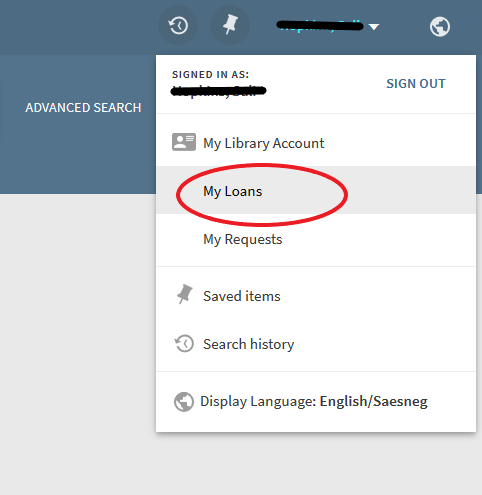
Your loans will be listed Click 'Renew' to the right of each item to renew it: 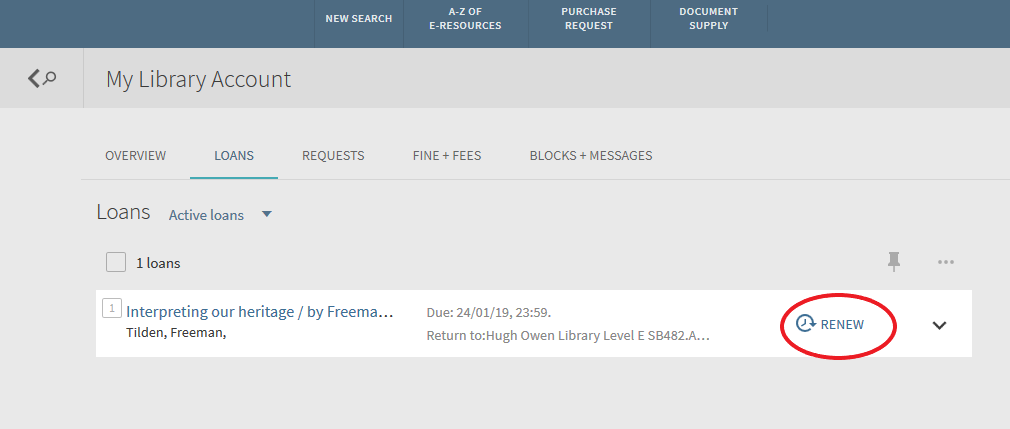 Your loans will be renewed for one week from now, not from the existing due date. Please note, you will be unable to renew your library loans if you have a Library fine of £5 or over. Please see our instructions on paying your library fines https://faqs.aber.ac.uk/index.php?id=314